.svg)
12 Best Reconciliation Tools: Ultimate Guide 2026


.webp)
Account reconciliation is a mandatory business process. While every business has its procedures, it follows a pretty standard process of matching transactions across ledgers and bank statements to ensure financial accuracy of accounts. Reconciliation tools help teams maximize their productivity and save time in what would otherwise be a very timely process of account reconciliation.

But, how do you find the tool that is right for your business? It begins by understanding what account reconciliation software is and then comparing the features/pricing of the best tools on the market. This guide aims to help you cover all the bases!
Best Reconciliation Tools Shortlist:
These are the platforms we’ve chosen based on how easy they are to work with and the features they offer:
- Solvexia - Best for automation of complex financial reconciliation
- Xero - Best for simple, small business bank reconciliation
- BlackLine - Best for financial close and reconciliation
- Bank Rec - Best for automated bank account reconciliation
- ReconArt - Best for flexible reconciliation and financial data matching
- Duco - Best for customizable data reconciliation across industries
- FloQast - Best for collaborative accounting close and reconciliation
- Adra by Trintech - Best for streamlined financial close and reconciliation
- Sage Intacct - Best for seamless ERP integration with advanced reconciliation
- Ledge - Best for high-volume, real-time reconciliation without coding
- HighRadius - Best for AI-powered reconciliation at enterprise scale
- OneStream - Best for enterprise reconciliation within unified CPM
Coming Up
What are the Best Reconciliation Tools in 2026?
What is Account Reconciliation Software?
How Does Automated Account Reconciliation Software Work?
What Types of Financial Data Can You Reconcile?
What Challenges Does Account Reconciliation Software Solve?
How Do I Know if I Need Account Reconciliation Software?
How Can Companies Succeed with Reconciliation Software?
How to Choose the Best Reconciliation Software?
What are the Best Features of Reconciliation Software?
What are the Benefits of Automation Reconciliation Software?
What are the Best Reconciliation Tools in 2026?
Choosing the right reconciliation tool means considering both the upsides and the downsides. Let’s take a look at what some of the best tools on the market have to offer.
1. Solvexia
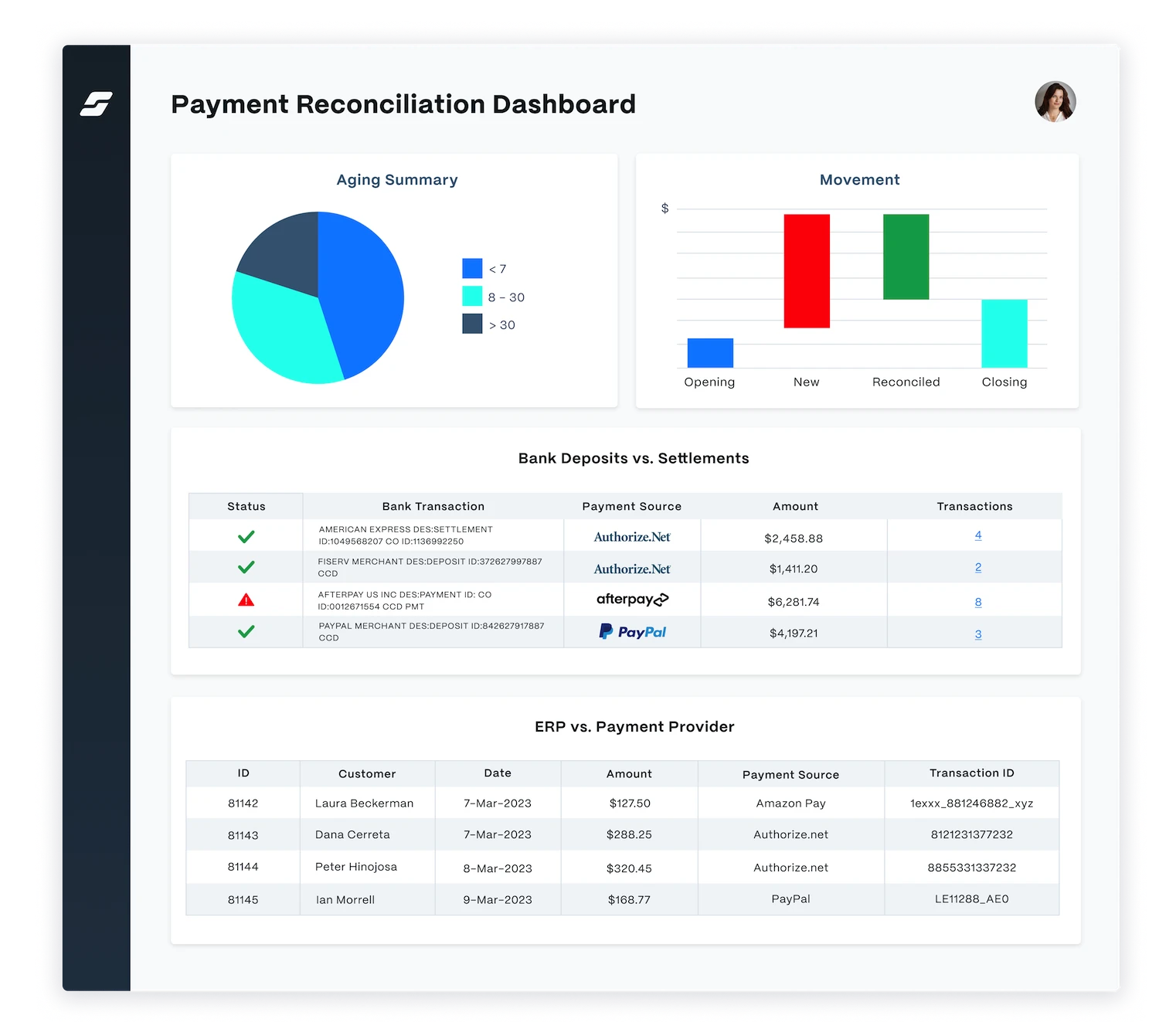
Best for automation of complex financial reconciliation
Solvexia is a Digital Work Platform for Finance Automation. Many organizations use Solvexia to automate their account reconciliations, with a critical benefit being significant (100x) gains in team productivity.
What sets Solvexia apart most from other tools is it is more extensible than financial close vendors because it has data transformation and enrichment capabilities. You go beyond just your GL or Bank data and produce analytics using more integrated data, for example, overlap with rebates and commission calculations or management dashboards.
How it helps finance teams:
Solvexia enhances team productivity by automating data processing, reporting, and reconciliation tasks, allowing teams to focus on analyzing and investigating exceptions.
Key Benefits:
- Enhanced Productivity: Automates data processing, reporting, and reconciliation, allowing teams to focus on analysis and exception investigation.
- Powerful Capabilities: Supports data ingestion in any format, complex data matching, and integration with various data sources.
- Scalability: Easily scales to accommodate growing businesses with customizable workflows.
Pros:
- Powerful data ingestion and matching capabilities
- Integrates with various data sources
- Provides alerts and notifications for variances
- Quick deployment and easy user management
- Scalable to accommodate growing businesses
- Customizable workflows to meet specific needs
- Comprehensive audit trails for compliance
- Robust analytics and reporting features
Cons:
- May require initial setup time to configure workflows
Why customers love it:
Customers appreciate Solvexia's ability to streamline complex reconciliations, reduce manual effort, and provide comprehensive analytics, making it a versatile tool for finance teams.
Key Features:
- Enterprise-Grade Automation: Data processing, reporting, audit trails, and more.
- Data Integration: Pulls information from general ledgers, banks, suppliers, etc., for quick reconciliation.
- Complex Data Matching: Handles data in any format with accurate matching.
- Alerts and Notifications: Notifies users of variances and exceptions.
- Cloud-Based: Secure cloud operation with seamless integration.
- Quick Setup: Ready in less than 30 minutes, with instant user addition.
- Minimal Tech Support: Managed without technical assistance.
- In-House Hosting Option: Can be hosted internally if desired.
- Extensibility: Automates any data-intensive finance task or workflow.
- Integrated Analytics: Produces comprehensive analytics, integrating rebates, commissions, and management dashboards.
- User Management: Fast setup and user management without technical help.
- Smart Matching: Handles complex reconciliations, including one-to-many and many-to-many relationships.
- Data Persistence: Eliminates transaction timing differences for easier investigations.
Pricing:
You can request a free Solvexia demo and get a customized quote to meet your business needs.
Rating:
2. Xero
Best for simple, small business bank reconciliation
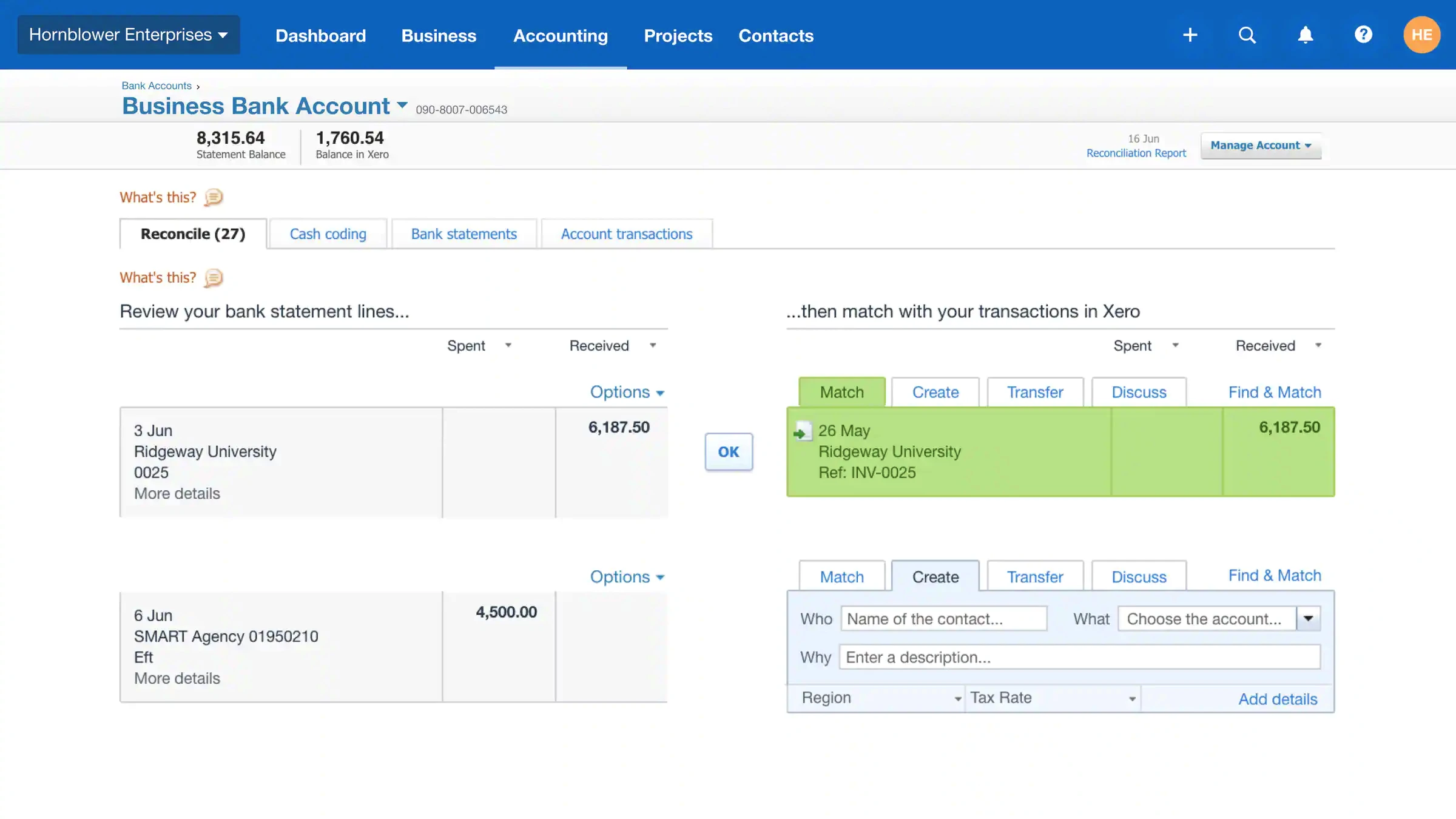
Xero’s online accounting software allows you to see your cash flow in real-time through an easy-to-use interface.
How it helps finance teams:
Xero allows finance teams to monitor cash flow, manage invoicing, track inventory, and reconcile accounts efficiently from anywhere with an internet connection.
Key Benefits:
- Real-Time Monitoring: See cash flow in real-time for better financial oversight.
- Comprehensive Features: Manage invoicing, inventory, and account reconciliation efficiently from anywhere.
Pros:
- Real-time cash flow monitoring
- Unlimited users on all plans
- Extensive reporting and transaction linking
Cons:
- Can become expensive for larger businesses with extensive needs
Why customers love it:
Users appreciate Xero's ease of use, comprehensive features, and the ability to manage financial tasks efficiently from a single platform.
Key Features:
- Bank Reconciliation: Simplifies the reconciliation of bank transactions.
- Online Accounting: Manage accounts with real-time updates.
- Invoicing: Easily create and send invoices.
- Inventory Tracking: Monitor inventory levels and movements.
- Bill Payments: Manage and pay bills directly.
- Reporting: Detailed reporting with links to all transactions.
Pricing and Trials:
- Free Trial: Offers a free trial for new users.
- Affordable Plans: Plans start at $27.50 per month.
Rating:
3. Blackline

Best for financial close and reconciliation
BlackLine is a cloud financial close software system that supports continuous improvement in your business.
How it helps finance teams:
BlackLine automates financial close processes, including reconciliations, ensuring accuracy and compliance across multiple currencies and geographies.
Key Benefits:
- Automates Financial Close: Streamlines financial close processes, including reconciliations, ensuring accuracy and compliance.
- Global Support: Handles multiple currencies and geographies efficiently.
Pros:
- Comprehensive financial close management
- Advanced reconciliation and accounting automation
- Strong internal controls and compliance support
Cons:
- Pricing information not readily available; requires contacting sales
Why customers love it:
Customers value BlackLine's robust features that enhance financial accuracy, compliance, and streamline the financial close process.
Key Features:
- Financial Close Management: Manages the entire financial close process.
- Reconciliations: Automates account reconciliations for improved accuracy.
- Accounting Automation: Enhances efficiency through automation of accounting tasks.
- Approval and Review Processes: Configurable workflows ensure accuracy across various currencies and geographies.
- Compliance and Data Management: Supports regulatory compliance with vast data management capabilities.
- Internal Control: Identifies discrepancies and strengthens internal controls.
Pricing:
- Custom Quotes: Pricing details are available upon request by contacting the sales team.
Rating:
4. Bank Rec
Best for automated bank account reconciliation
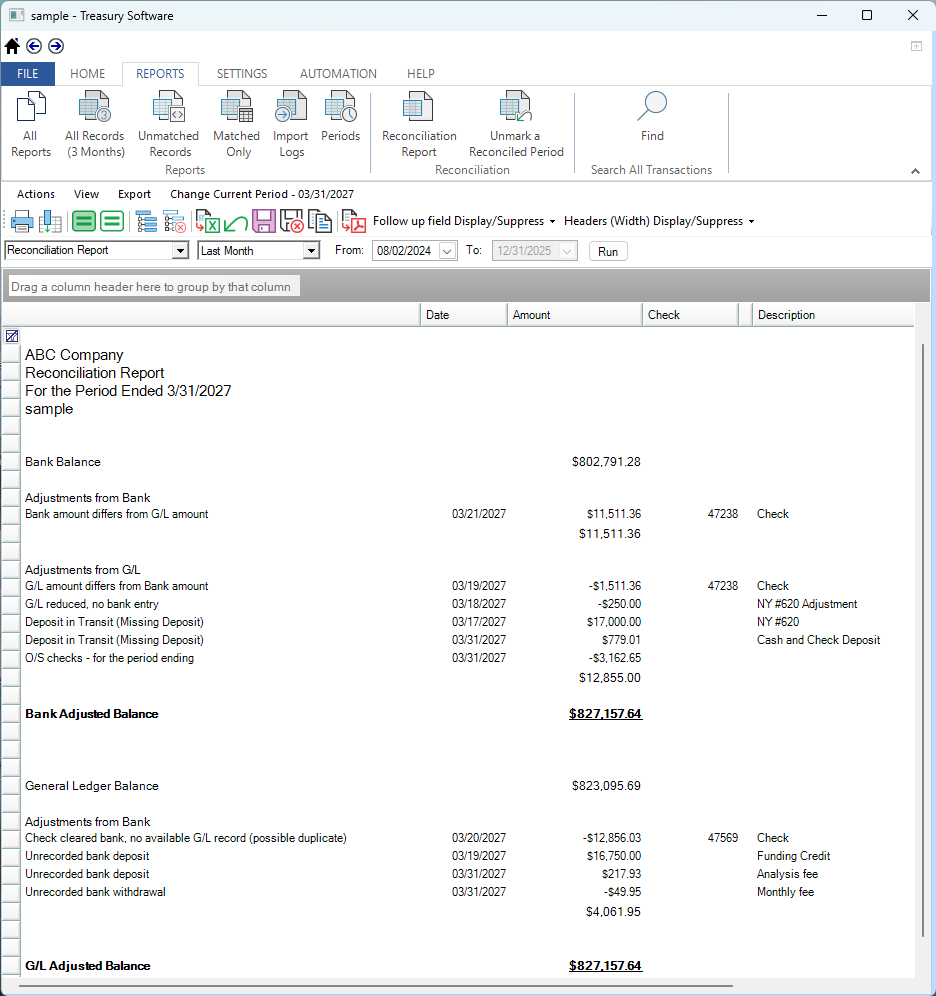
Treasury Software’s product Bank Rec reconciles accounts automatically through transaction management.
How it helps finance teams:
Bank Rec reduces manual effort by automatically matching transactions and rolling forward unmatched records, allowing teams to focus on analysis and decision-making.
Key Benefits:
- Automatic Reconciliation: Automates the reconciliation process, allowing teams to focus on analysis and decision-making.
- Customizable Matching: Offers flexible, customizable matching rules to fit specific reconciliation needs.
Pros:
- No setup fees
- Flexible payment options
- Customizable matching rules
Cons:
- Limited to five users in the basic plan
Why customers love it:
Customers appreciate the ease of use, cost-effectiveness, and the ability to tailor the tool to their specific reconciliation needs.
Key Features:
- Automatic Reconciliation: Reconciles accounts through transaction management, reducing manual intervention.
- Matching Rules: Allows setup of matching rules to automate the reconciliation process.
- Unmatched Records Management: Rolls forward unmatched records until they find a match.
- High-Speed Matching: Quickly matches accounts for efficient reconciliation.
- Identification and Tracking: Identifies, tracks, and resolves matches.
- Import and Automation: Facilitates importing and automating transactions.
Pricing:
- No Setup Fees: No fees required for setup.
- Subscription Model: Monthly subscription starting at $99.95.
- Upfront Purchase Option: Option to buy the product outright.
- User Inclusion: Both payment options include five users.
Rating:
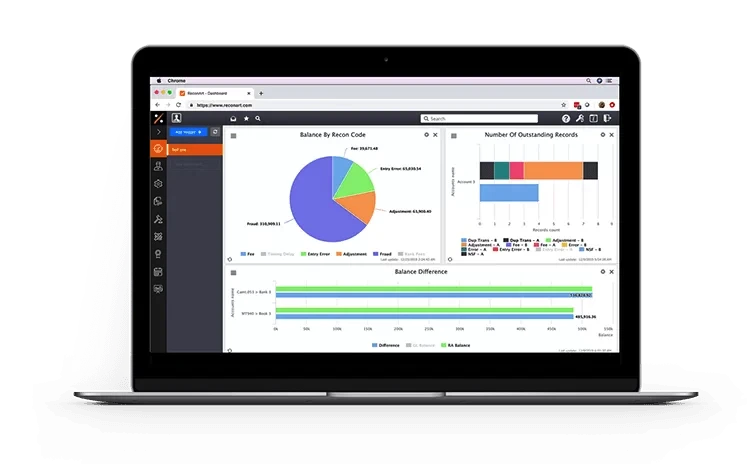
5. ReconArt
Best for flexible reconciliation and financial data matching
ReconArt is entirely web-based reconciliation software that can also be hosted on-site if desired.
How it helps finance teams:
ReconArt automates bank, credit card, balance sheet, and other reconciliations, ensuring accuracy and efficiency in financial processes.
Key Benefits:
- Automation and Accuracy: Automates bank, credit card, balance sheet, and other reconciliations to ensure accuracy and efficiency.
- Integration: Seamlessly integrates with ERPs and internal systems.
Pros:
- Comprehensive reconciliation capabilities
- ERP and system integration
- Full automation of reconciliation processes
Cons:
- Higher cost with a minimum user requirement
Why customers love it:
Customers value ReconArt's specialization in reconciliation, robust automation features, and the ability to handle complex financial tasks efficiently.
Key Features:
- Platform Flexibility: Entirely web-based with an option for on-site hosting.
- Comprehensive Reconciliation: Supports bank, credit card, balance sheet, financial close, accounts, variance analysis, journal entry, and intercompany reconciliations.
- ERP and System Integration: Seamlessly integrates with ERPs, platforms, and internal systems.
- Full Automation: Automates various reconciliation processes, saving time and improving efficiency.
- Dedicated Solution: Focuses exclusively on reconciliation tasks, suitable for companies of all sizes.
- Scalable Pricing: Available for purchase starting with a minimum of five users at $1,500 per month, providing a scalable solution for growing businesses.
Pricing:
- Minimum Users: Requires a minimum of five users.
- Subscription Cost: Starts at $1,500 per month.
Rating:
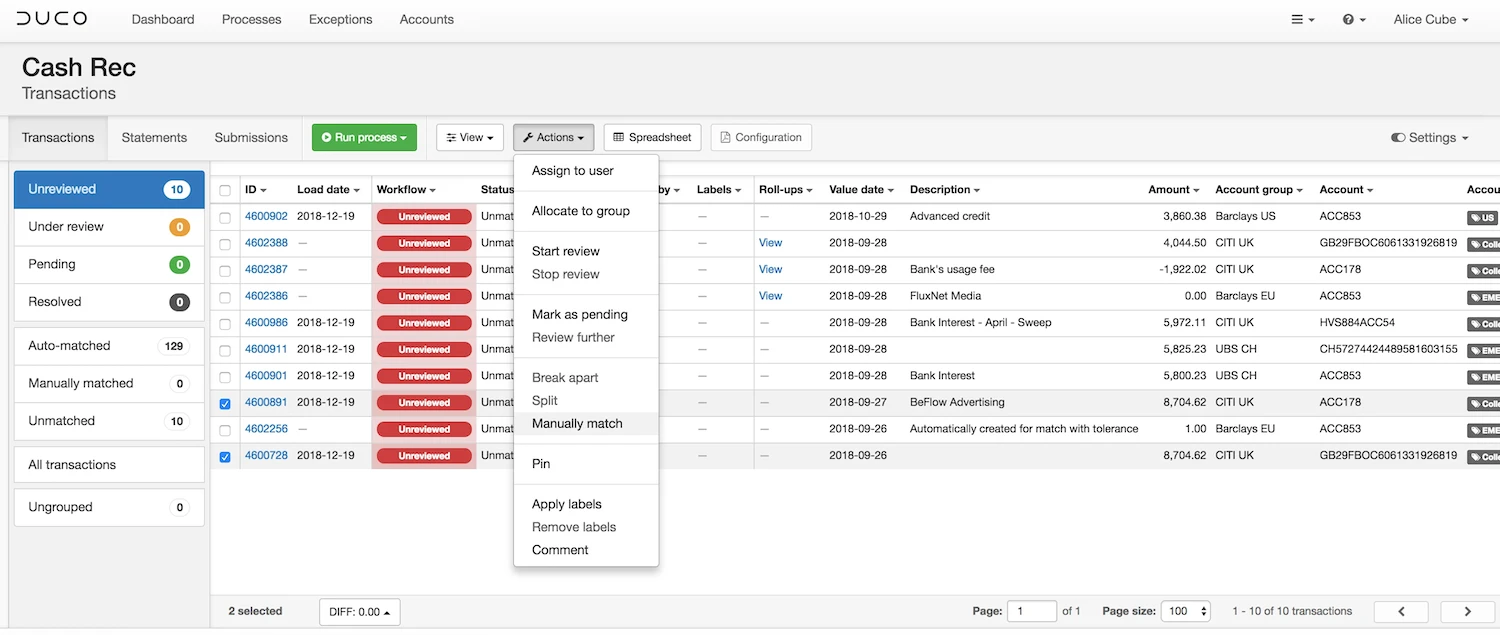
6. Duco
Best for customizable data reconciliation across industries
Duco is a cloud-based, rule-based reconciliation platform designed for financial institutions and businesses managing large volumes of data. It automates the matching and reconciliation of financial transactions and offers flexible solutions for handling various types of data.
Best for organizations needing a robust rule-based system for transaction matching and exception management, Duco streamlines reconciliation tasks while offering powerful exception handling to improve efficiency and accuracy.
How it helps finance teams:
Duco assists finance teams by automating the entire reconciliation process, reducing manual work and improving data accuracy. It uses AI and customizable rules to identify discrepancies, allowing teams to focus on handling exceptions. With its no-code platform, it’s accessible to non-technical users and integrates easily with other financial systems.
Key Benefits:
- Real-Time Data Validation: Duco’s platform provides real-time data validation, ensuring quick identification and resolution of discrepancies.
- AI-Driven Exception Management: The platform automatically handles exceptions, saving teams time and improving reconciliation accuracy.
Pros:
- No-code platform for easy use by non-technical staff
- Customizable rules for matching transactions, adaptable to unique business needs
- Real-time data validation and exception management, reducing manual intervention
- Scalable and flexible, suitable for handling complex reconciliation across different financial systems
- Strong integration capabilities with various accounting and ERP systems
Cons:
- Limited advanced features for broader financial management like some competitors
- Can be more complex to set up for smaller businesses with simpler needs
- The platform primarily focuses on rule-based reconciliation, lacking in-depth analytics and financial close tools
Why customers love it:
Customers appreciate Duco for its ease of use and flexibility, especially its no-code interface, which allows teams to set up reconciliation processes quickly without needing IT support. Its ability to manage complex reconciliations across various data types and its real-time data validation are also major highlights.
Key Features:
- Rule-Based Matching: Users can create custom rules for transaction matching.
- Exception Management: Automatically identifies and resolves discrepancies in the reconciliation process.
- Data Quality Assessment: Assesses data integrity to improve reconciliation accuracy.
- AI-Driven Setup: Uses AI to predict and simplify reconciliation rules.
- Audit Trails: Comprehensive audit logs for regulatory compliance and internal audits.
Pricing and Trials:
Duco’s pricing is not available publicly, and businesses must contact the sales team for a customized quote. There is typically no free trial advertised, so interested users will need to inquire directly for further information on trial or demo options.
Rating:
7. FloQast
%25201.webp)
Best for collaborative accounting close and reconciliation
FloQast is a cloud-based accounting automation platform designed to streamline financial close and account reconciliation for finance teams. It is best suited for mid-sized to large organizations with complex reconciliation and financial close needs, offering collaborative workflows, real-time monitoring, and task management features to optimize financial processes.
How it helps finance teams:
FloQast accelerates reconciliations by automating manual tasks, enabling real-time monitoring, and providing collaborative tools to improve team productivity. It helps reduce errors, ensures compliance, and centralizes financial operations.
Key Benefits:
- Efficiency: Reduces manual reconciliation tasks, improving overall team efficiency.
- Collaboration: Enhances collaboration and task management within finance teams.
Pros:
- AI-driven reconciliation (AutoRec) reduces manual work
- Real-time task management and tracking
- Supports multi-user collaboration with version control
- Pre-built templates expedite setup
- Integrates seamlessly with ERPs and cloud platforms like Microsoft Suite and Slack
Cons:
- Higher cost compared to some alternatives
- Limited to reconciliation and financial close management; lacks broader FP&A functionalities
- Some users find specific modules like Flux Reporting harder to use
Why customers love it:
Customers value FloQast for its easy-to-use interface, robust automation features, and collaborative workflow tools that allow finance teams to work efficiently without losing oversight. The centralized platform offers transparency and speeds up the financial close process, making it a top choice for organizations focused on precision and productivity.
Key Features:
- AutoRec: AI-powered reconciliation automation.
- Real-Time Monitoring: Track progress and variances in real time.
- Task Management: Delegate and track reconciliation tasks easily.
- Collaboration Tools: Multi-user workflows with version control.
- Pre-Built Templates: Simplify onboarding and standardize reconciliation processes.
- Audit Trail: Comprehensive tracking for regulatory compliance.
Pricing and Trials:
Pricing is not listed publicly; contact FloQast for a quote. Free trial available.
Rating:
8. Adra by Trintech

Best for streamlined financial close and reconciliation
Adra by Trintech is a cloud-based platform that automates financial close processes, including reconciliation, transaction matching, and task management. Best for small to mid-sized businesses seeking fast, automated financial reconciliation, it simplifies workflows and enhances accuracy.
How it helps finance teams:
Adra reduces manual tasks, enabling faster and more accurate reconciliations, while providing real-time insights and centralizing workflows to improve efficiency and visibility.
Key Benefits:
- Time Savings: Automates repetitive reconciliation tasks, reducing time spent on month-end close.
- Accuracy: Reduces human errors and improves accuracy in financial reports.
Pros:
- Automates multi-way transaction matching
- Provides real-time insights and dashboards
- Centralizes financial close tasks for visibility
- Improves compliance with built-in controls
Cons:
- Limited customization for complex processes
- Pricing is not transparent, requiring consultation with the sales team
Why customers love it:
Customers appreciate Adra’s automation capabilities that reduce time spent on manual tasks and the platform’s user-friendly interface, allowing for more efficient financial close processes
Key Features:
- Multi-Way Transaction Matching: Automates matching across multiple sources.
- Balance Sheet Reconciliation: Streamlines reconciliation processes.
- Task Management: Centralized management for financial close activities.
- Real-Time Analytics: Offers customizable dashboards and reports.
Pricing and Trials:
Adra’s pricing is not listed publicly; interested users must contact Trintech’s sales team for a quote. A free demo is available on request.
Rating:
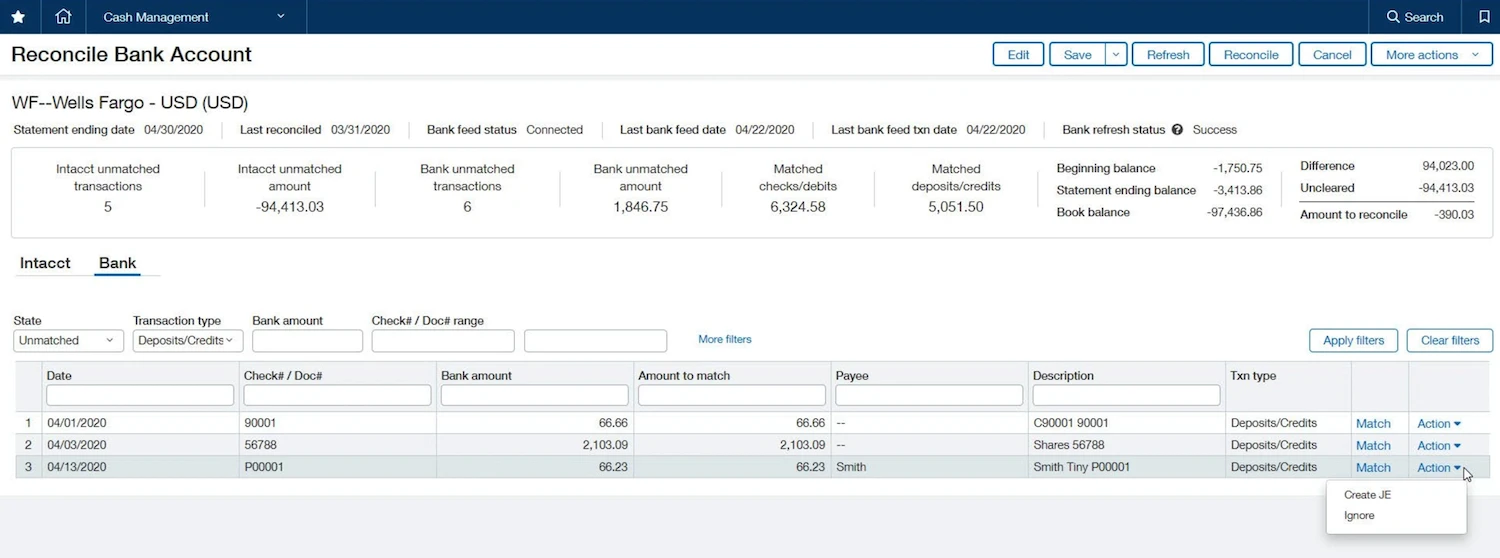
9. Sage Intacct
Best for seamless ERP integration with advanced reconciliation
Sage Intacct is a cloud-based accounting and financial management platform designed for growing businesses to automate key processes such as general ledger, accounts payable/receivable, and account reconciliation.
It is best suited for mid-sized companies and expanding organizations, it provides comprehensive financial management and real-time financial insights to support scalable growth and improve efficiency.
How it helps finance teams:
Sage Intacct streamlines accounting processes through automation, multi-dimensional reporting, and real-time dashboards. It improves efficiency, enhances compliance, and offers flexibility to manage multi-entity consolidations and financial close processes.
Key Benefits:
- Efficiency: Increases productivity by automating time-consuming financial tasks.
- Visibility: Real-time financial data and insights for better decision-making.
Pros:
- Comprehensive automation for accounting processes
- Real-time reporting and financial insights
- Multi-entity and multi-currency support
Cons:
- Pricing can be higher for smaller organizations
- Requires time and expertise for full implementation
Why customers love it:
Customers appreciate Sage Intacct for its robust automation features, real-time insights, and powerful multi-entity management capabilities.
It helps finance teams reduce manual tasks, streamline financial processes, and improve reporting accuracy, making it ideal for growing organizations with complex financial needs
Key Features:
- Automation: Automates tasks like reconciliations, accounts payable, and journal entries.
- Real-Time Dashboards: Multi-dimensional reporting provides insights across various financial dimensions.
- Multi-Entity Consolidation: Consolidates financials across multiple entities and currencies.
- Collaboration Tools: Provides version control and task management for teams.
- Audit Trails: Ensures compliance with a full audit trail for all financial actions.
Pricing:
Sage Intacct offers custom pricing based on business needs. Interested users can contact their sales team for a personalized quote and explore a free product tour.
Rating:
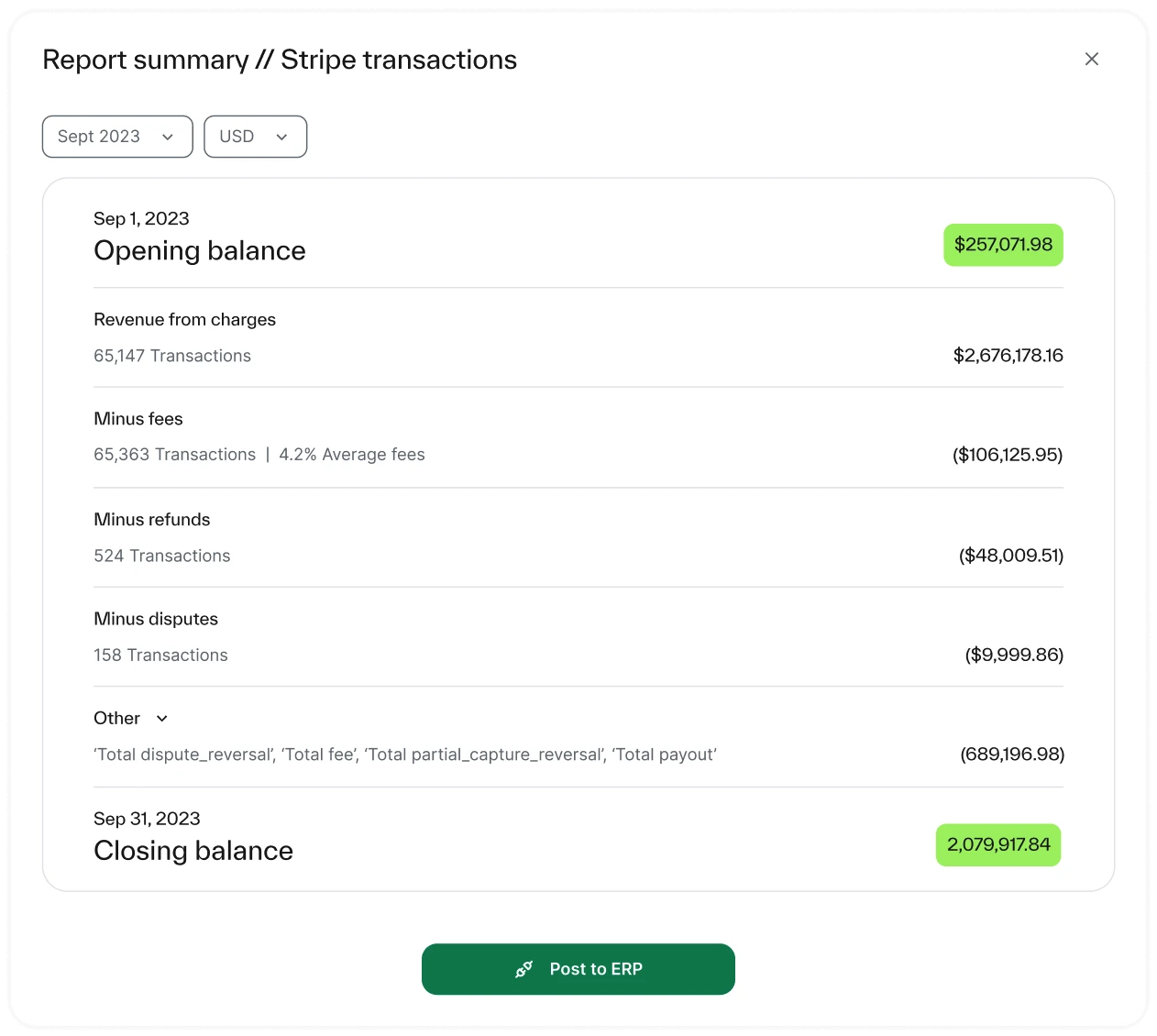
10. Ledge
Best for high-volume, real-time reconciliation without coding
Ledge is an AI-powered finance operations platform designed for fast-growing businesses managing high transaction volumes or complex finance operations.
It automates high-volume reconciliations with real-time transaction matching and exception management, providing a scalable, quick-to-deploy solution that doesn't require heavy IT support. This allows companies to handle complex financial processes efficiently while focusing on strategic tasks rather than manual reconciliation efforts.
How it helps finance teams:
Ledge automates end-to-end reconciliations, including complex payment flows, and offers pre-built integrations with over 12,000 institutions, ensuring quick setup and continuous operation. It eliminates manual processes, enabling finance teams to focus on higher-value tasks.
Key Benefits:
- Scalable Automation: Manage high-volume reconciliations without additional resources.
- Real-Time Insights: Monitor cash flow and transactions instantly.
Pros:
- No-code setup and quick implementation
- Handles complex reconciliation scenarios (one-to-many, batch payments)
- Pre-built integrations with 12,000+ institutions
- Real-time notifications for exceptions
Cons:
- Customization may be limited for unique workflows
- Pricing details not publicly available
Why customers love it:
Customers appreciate Ledge for its fast, no-code implementation, allowing them to automate complex reconciliation processes without requiring significant IT support. Its ability to handle high transaction volumes, along with pre-built integrations with over 12,000 institutions, makes it an attractive solution for growing businesses.
The platform's real-time notifications and exception management streamline finance workflows, ensuring efficiency and transparency. Additionally, its scalability ensures that companies can expand without worrying about bottlenecks in reconciliation tasks.
Pricing:
Ledge offers customized pricing based on your business needs.
Rating:
Not available.
10. HighRadius
Best for AI-powered reconciliation at enterprise scale
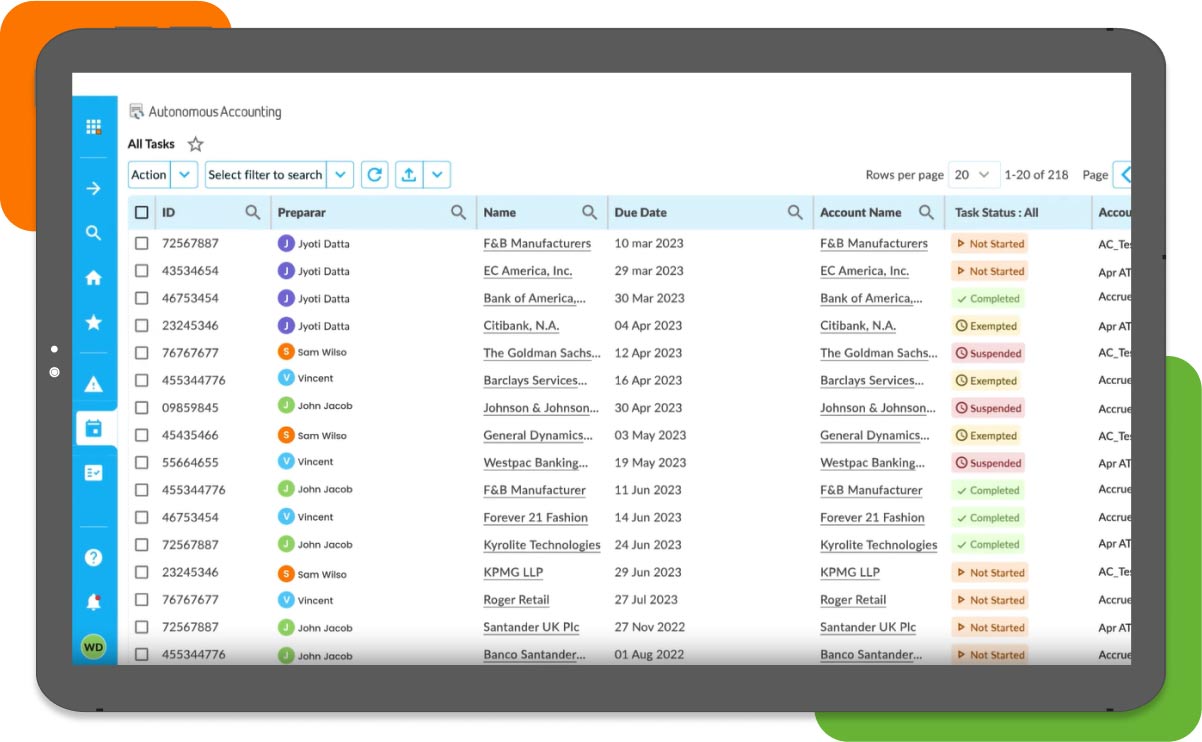
HighRadius is a cloud-based, AI-powered reconciliation platform built for enterprise finance teams. It automates transaction matching, exception management, and journal entries across multiple ERPs and banks using intelligent rules and real-time insights.
How it helps finance teams:
Reduces manual reconciliation effort, accelerates month-end close, and improves cash flow visibility with predictive analytics and automation.
Key benefits:
- Accuracy: Automated matching reduces errors and improves financial reliability.
- Visibility: Real‑time dashboards, alerts, and progress tracking enable teams to spot issues early.
- Scalability: Handles increasing transaction volumes, multiple entity GLs, and integrates across ERPs.
Pros:
- Enterprise-grade scalability
- Excellent fraud detection and audit controls
- Strong ERP integration (SAP, Oracle, NetSuite)
Cons:
- Complex onboarding
- Not ideal for small finance teams
Why customers love it:
Finance leaders praise its ability to reduce DSO, eliminate manual errors, and deliver productivity gains in under six months.
Key features:
- AutoMatch Engine: AI/ML transaction rule matching
- Exception Workflow: Smart routing and resolution
- Live Dashboards: Monitor reconciliation KPIs
- Audit Trail: Track every user and change
- Scalable Architecture: Handles high-volume, multi-entity data
Rating:
11. OneStream
Best for enterprise reconciliation within unified CPM
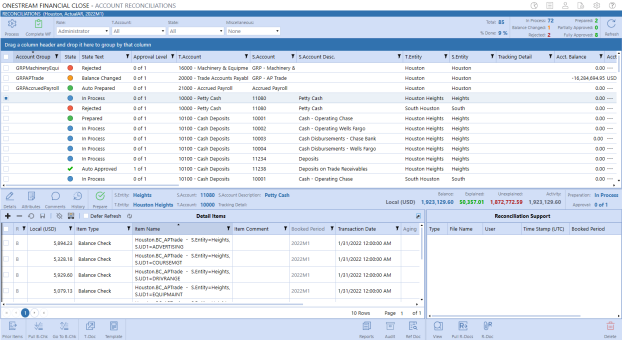
OneStream is a unified corporate performance management (CPM) platform that embeds account reconciliations within the broader financial close, consolidation, and reporting lifecycle. It’s ideal for global enterprises needing scalability, audit control, and complete financial visibility.
How it helps finance teams:
It aligns reconciliations directly with financial reports using Trial Balance Single-Sourcing. Reconciliation processes are automatically updated when trial balances change, ensuring real-time accuracy and transparency.
Key Benefits:
- Risk-Based Oversight: Monitor high-risk reconciliations in real-time and prioritize review with embedded risk reporting.
- Unified Data: Align financial reporting and reconciliation using shared trial balance data to eliminate disconnects.
- Internal Control: Maintain strong governance with built-in audit trails, approvals, and reconciliation alerts.
Pros:
- Unified platform for close, consolidation, and reconciliation
- Drill-to-reconciliation from reported balances
- Risk-based views to flag and monitor high-risk reconciliations
Cons:
- Steeper learning curve
- Premium pricing and implementation effort
Why customers love it:
Finance teams value its full audit trail, instant reconciliation alerts, and deep integration with financial workflows.
Key features:
- Trial Balance Single-Sourcing: Aligns reconciliations and reports on shared data
- Drill-to-Reconciliation: Jump from balance sheet to account details
- Risk-Based Reporting: Monitor high-risk accounts across entities
- Reconciliation Alerts: Flags when previously reconciled accounts change
- Audit Trail & Approvals: Full certification workflow and tracking
Pricing:
Starts around $150K/year (custom quote required)
Rating:
What is Account Reconciliation Software?
Bank account reconciliation software centralizes the financial close process and automates it for businesses. The software pulls data from the general ledger and compares it to bank statements and invoices to quickly reconcile accounts. Then, the software allows the preparer to electronically sign off upon completion and send it over to the approver for a final review. Once it’s approved, the software stores the data in the centralized database and provides your business with a secure audit trail.
Most software systems allow for teams to upload supporting documents, view company policies, electronically sign off on reconciliations and leave comments, if needed. It also allows for controls to be set up so that processes are gated between employees for audit and compliance requirements. Additionally, the tool may provide users with a dashboard or a visual representation of current financial standing.
How Does Automated Account Reconciliation Software Work?
Automated account reconciliation software streamlines the entire process from data ingestion to exception management, eliminating the need for spreadsheets and manual inputs. Here's how it works:
- Data Integration: The system pulls financial data from banks, ERPs, and payment platforms, automatically standardizing and syncing records across systems. This ensures consistency and supports high transaction volumes without added effort.
- Transaction Matching: Intelligent rules (e.g. by amount, date, or reference) auto-match transactions across ledgers, drastically reducing manual reviews and accelerating the close process.
- Exception Handling: Mismatches or anomalies are flagged instantly. Recurring issues are resolved with rules-based logic, while complex exceptions are routed to the right teams helping reduce financial risk.
- AI & Machine Learning: Advanced solutions learn from past reconciliations, improving match accuracy and providing predictive insights to detect fraud or cash leakage early.
- Real-Time Reporting & Compliance: Dashboards provide instant visibility, while audit trails ensure full regulatory compliance and simplify external audits.
What Types of Financial Data Can You Reconcile?
Automated account reconciliation tools can handle a wide variety of financial data sources giving finance teams a single platform for matching, verifying, and closing:
- Bank and Cash Transactions – including deposits, withdrawals, transfers, fees, outstanding checks, and timing-difference items from multiple bank accounts and currencies.
- Credit Card and Payment Processor Records – reconcile incoming and outgoing payments from credit cards, digital wallets, PSPs, gateways (e.g. Stripe, PayPal), refunds, chargebacks and partial payments.
- Accounts Receivable / Invoice Payments – match customer invoices, payments, unapplied cash, and credits to GL balances and payment processor records.
- Accounts Payable / Pay-outs – handle supplier payments, vendor invoices or payouts against bank or ERP payables subledgers, and confirm funds movement.
- Intercompany and Multi-Entity Transactions – reconcile transfers between subsidiaries or internal entities, ensuring eliminations and balances align for consolidation.
- Sub-ledgers and Specialized Flows – such as expense reimbursements, payroll, prepaid assets, or recurring billing/matching flows in a unified environment.
What Challenges Does Account Reconciliation Software Solve?
Automated account reconciliation software addresses key pain-points that slow down finance teams and increase risk:
- Time-consuming manual matching and spreadsheet chaos - sorting through rows of bank statements, payments, and GL transactions by hand is laborious and error-prone. Automation accelerates the match process and reduces backlog.
- Data fragmentation and inconsistent imports - disparate systems and formats slow reconciliation. A unified platform centralizes data, standardizes formats, and avoids mapping or formatting bottlenecks.
- Delays in detecting anomalies or discrepancies - manual review can miss or postpone identifying mismatches, fraud, or errors. Automation flags outliers quickly, often in real time.
- Lack of audit trail or compliance visibility - manual work makes it hard to track who reviewed what and when. Reconciliation software builds structured workflows, logs every adjustment, and supports secure document storage so audits are simpler and financial controls are strengthened.
By solving these challenges, reconciliation tools let finance professionals shift focus from mechanical tasks to meaningful analysis, faster closes, and greater confidence in financial results.
How Do I Know if I Need Account Reconciliation Software?
While most finance teams can benefit from account reconciliation software, the need usually becomes clear when manual processes start creating risk, delays, or bottlenecks. Here are some clear signals it may be time to automate:
- Recurring errors
If discrepancies keep appearing in your reconciliations, journals, or financial reports, manual checks are likely breaking down. Automation helps enforce consistency, rules, and controls across every reconciliation. - Time pressure
When reconciliations stretch from days into weeks—especially around month-end or year-end—it’s a sign the process no longer scales. Software reduces effort so reconciliations happen faster and on time. - Transaction growth
As transaction volumes increase or data sources multiply, spreadsheets become harder to manage. Reconciliation software is designed to handle complexity without adding manual work. - Compliance risk
If audits, controls, or regulatory requirements are difficult to evidence, automated reconciliation provides clear audit trails and governance. - Limited visibility
When it’s hard to see reconciliation status, bottlenecks, or exceptions in real time, software restores control and transparency across the process.
How Can Companies Succeed with Reconciliation Software?
Wondering whether automation truly transforms finance operations?
Our real-world results speak volumes. Here's how different companies have revolutionized their reconciliation processes with Solvexia:
Cutting reconciliation time from days to minutes
7-Eleven Philippines processes over 500,000 transactions daily across more than 3,400 stores. Manual spreadsheet reconciliations once took days to complete. With Solvexia, e-wallet reconciliations are now finished in minutes, enabling daily exception reporting and reducing fraud risks.
“I’ve been working in the IT industry for 25 years and it’s rare to see a vendor like Solvexia… the system has really been tailor-suited for us.”
— Arvin Reyes, Head of IT
Scaling reconciliation across global payment platforms
Emma Sleep manages transactions from more than 30 payment service providers and marketplaces. With Solvexia, the Accounts Receivable team reconciles 100,000 transactions daily — 500% faster than before. The automation has eliminated manual bottlenecks, removed the need for outsourcing, and allowed staff to focus on higher-value projects.
“Solvexia is a vital part of our current ERP because without it summarizing the transactions, we wouldn’t be able to push through with the current setup that we have.”
— Alisa Donato, Accounts Receivable Accountant
Future-proofing operations as transaction volumes soar
A US-based Fintech company with 100+ locations used to rely on manual spreadsheets for ACH and credit card reconciliations, consuming over 20% of staff time each week. After implementing Solvexia, ACH reconciliations are now 350% faster and credit card reconciliations are 700% faster. Teams spend minutes instead of hours reconciling, freeing up capacity for analysis and growth.
“We chose Solvexia because of its straightforward and transparent approach to automating reconciliations. The solution is scalable and easily learned. The team not only met our expectations, but exceeded them.”
— Director of Treasury Operations
How to Choose the Best Bank Reconciliation Software?
Selecting the best bank reconciliation tools involves several key considerations:
1. Features:
- Look for automation capabilities such as bank feeds, automatic matching, and rule setup.
- Ensure the software integrates seamlessly with your existing accounting systems.
2. Pricing:
- Evaluate your budget and choose software that offers value without including unnecessary features.
3. Ease of Use:
- Opt for a user-friendly platform that simplifies the reconciliation process, reducing manual effort.
4. Scalability:
- Ensure the software can grow with your business, accommodating increased transaction volumes and additional users as needed.
5. Customization and Support:
- Check for customizable options and robust customer support to assist with any issues or specific requirements.
By focusing on these factors, your finance team can find a software solution that enhances efficiency and accuracy in financial reconciliation, ensuring smoother operations and more reliable financial management.
What are the Best Features of Reconciliation Software?
When looking for the best reconciliation tools, you’ll want to make sure the following features are included:
- Reporting: A statement can be produced to highlight any records that are unmatched between the GL and bank statement. The system should also be able to compare financial reports from previous historical periods in time and provide comprehensive dashboards for tracking KPIs and unreconciled transactions
- Workflow: Opt for software with customizable workflow management to streamline your reconciliation processes. It should provide task sequencing, completion tracking, and review capabilities for efficient process governance.
- Issue management: If there’s an issue, the tool should identify the exception and be able to roll forward unresolved issues into subsequent periods until it’s been resolved. You can also leverage a clean-up method to resolve issues manually.
- Transaction matching: This is the crux of the tool, where data from various sources is pulled, compared, and matched. Look for software that offers advanced, customizable matching rules for both individual accounts and company-wide policies. The system should support various matching criteria, including exact matches, fuzzy logic, and multi-level matching hierarchies, while allowing you to define tolerance levels for variances.
- Automated data import: Look for a tool with robust data integration capabilities that can automatically pull data from bank statements, invoices, and the general ledger. This is important because not only does it save time, but it also reduces the risk of manual input errors.
- Audit trail: The software should be able to store every action taken during the reconciliation process to comply with regulations.
- Security: As a primary concern, the tool should protect and securely store data to prevent breaches and hacks.
- Scalability: As your business grows, so does your transaction volume. Find a software that can keep up with this growth, which means that it won’t slow down as it has to compare more data and line items.
What are the Benefits of Automation Reconciliation Software?
Account reconciliation software saves your team time. More than saving time, it offers many necessary businesses like providing consistency, accuracy and clarity plus it reduces compliance risk, which can ultimately save you money, prevent fraud and maintain your entire company’s reputation.
Here’s a look at some of the significant benefits of account reconciliation software.
1. Fully Automated and Fast
One of the essential benefits of reconciliation software like Solvexia is that it is fully automated. This makes it easy to complete the financial close process in no time. Many finance teams spend the majority of their time inputting data, trying to understand variances and wasting time on manual and repetitive tasks.
With account reconciliation software, the process is managed automatically, freeing up your team to focus on high-level work, while improving accuracy and insights while improving controls and reducing audit risks.
2. Uniform Approach / Standardized Process
The reconciliation process should happen monthly. At the very least, it will take place quarterly, so it helps to standardize the process to ensure its accuracy. With account reconciliation software, the system will run reconciliations according to the automated process the same way, every time.
This is particularly useful if your reconciliations take data from different systems, and there is complex and varied mapping and data cleansing involved. Reconciliation software removes automated this process, saving time and improving accuracy.
3. Reduce Errors & Enhance Internal Controls
Reconciliation tools allow for enhanced internal controls because leaders and stakeholders can see how the process is functioning and rest assured that it’s running smoothly every time. It also prevents any actions outside the process, while alerts can also be set-up for any unusual variances or activities.
By reducing manual human inputs, and with automatic mapping, you are also able to reduce errors. The software is trained to be accurate, which will prevent many potentially costly mistakes from occurring, while alerts will help identify problems as they happen in real-time.
4. Recorded History
The software stores all data history and reconciliations. This is useful not only for audit trails and compliance but also for historical information. You can check in on how much something costs in the past and help to forecast future expenses. This way, you can better budget and manage financials in your business.
5. Delegated Responsibilities
With account software, you can assign roles and manage access controls. In this way, every person on your team is aware of their position and responsibilities. When reconciliation needs to go through an approval process, then the system will automatically assign the next step to the approver as required.
6. Scalable for Growth
As your company grows, your transaction volume increases, often exponentially. Automated financial reconciliation tools scale effortlessly with your business, handling millions of transactions across multiple accounts or entities without requiring additional headcount.
7. Cost Savings
By reducing manual effort, accelerating cycle times, and minimizing errors and rework, automation contributes to meaningful cost savings. Teams are freed up to focus on more strategic initiatives that add greater value to the business.
8. Fraud Detection
Built-in controls and exception-based reporting help flag suspicious patterns or anomalies early. This proactive monitoring helps prevent internal or external fraud before it becomes a financial or reputational issue.
9. Real-Time Insights
Automation provides visibility into the reconciliation process in real-time. With dashboards and drill-down capabilities, finance teams can make faster, more informed decisions with up-to-date data at their fingertips.

Wrapping Up
Ultimately, any business will have to perform financial close and account reconciliations. As a public company, these processes are highly regulated, and if done incorrectly, could cost you your business.
For small and large companies alike, performing accurate reconciliations can reduce fraudulent charges and help identify mistakes in financial processes. Having an up-to-date view of your business’ cash flow is directly correlated to making wise business decisions.
All in all, using the best reconciliation tools like Solvexia will save your team time, allow every person to understand their role and responsibility better, and provide you with a convenient and secure location to store recorded financial history.
FAQ
What is reconciliation software?
Reconciliation software is a tool that automates the process of comparing your financial records like ledgers, bank statements, sub‑ledgers and spotting differences.
It replaces manual methods (spreadsheets, paper trails) by matching transactions, flagging unexplained variances, maintaining audit‑ready trails, and helping you close periods faster with more accuracy and less stress.
How does automated reconciliation software work?
It connects to your systems like your ERP, bank feeds, invoices and pulls in data automatically. Then it applies smart rules (and sometimes machine learning) to match transactions across sources. If something doesn’t match, it flags it for review.
You’ll get a clear dashboard showing what’s matched, what’s not, and why. Some platforms even help with journal entries or escalate exceptions for faster resolution. It’s faster, cleaner, and way less manual.
What’s the best account reconciliation software?
The best reconciliation tool really depends on your needs but if you're looking for something powerful, scalable, and surprisingly easy to use, Solvexia stands out.
It automates even the most complex reconciliations across multiple data sources, with built-in workflows, exception handling, and a no-code interface your team can actually use without IT.
If you want to save hours every month, reduce manual errors, and gain real visibility, Solvexia is a strong place to start.
What is reconciliation in accounting?
Reconciliation in accounting is how your finance team can confirm that account balances are accurate and complete. It involves comparing figures in your general ledger with supporting records or external data sources, such as bank statements or sub-ledgers.
When differences appear, your team investigates and resolves them before reporting. Reconciliations are typically completed at period-end and play a key role in helping you maintain accurate financial reporting, stay audit-ready, and quickly identify errors or unusual activity.
What are the benefits of account reconciliation software?
Account reconciliation software helps your finance team save time, reduce risk, and improve accuracy by automating manual matching and exception handling.
With Solvexia, you can:
- Reconcile faster by connecting directly to your source systems and applying consistent rules across high-volume reconciliations.
- Catch issues early as discrepancies are automatically flagged, audit trails are maintained, and visibility improves across accounts and periods.
- Scale with confidence as transaction volumes grow—helping your team close faster and maintain control without adding manual work.
This allows your team to spend less time reconciling data and more time focusing on insights and decision-making.
What are the common challenges in implementing reconciliation software?
While reconciliation software delivers clear benefits, finance teams can face challenges during selection and rollout. Common issues include:
- Tool fit
Selecting software that meets your team’s needs without adding unnecessary complexity or cost. - Integration effort
Connecting the solution to ERPs, banks, and source systems without disrupting existing workflows. - Change adoption
Moving your team away from spreadsheets and manual processes with minimal training and resistance. - Scalability concerns
Ensuring the platform can handle growing transaction volumes and data complexity over time. - Visibility and control
Maintaining strong audit trails, access controls, and compliance throughout implementation.
Solvexia is designed to address these challenges by offering flexible integrations, configurable rules, and an intuitive interface that helps teams get value quickly and scale with confidence.
Intelligent reconciliation solution
Intelligent rebate management solution
Intelligent financial automation solution
Intelligent Financial Automation Solution
Intelligent financial automation solution
Intelligent financial automation solution
Intelligent financial automation solution
Intelligent financial automation solution
Intelligent regulatory reporting solution
Free up time and reduce errors
Recommended for you

Request a Demo
Book a 30-minute call to see how our intelligent software can give you more insights and control over your data and reporting.

Reconciliation Data Sheet
Download our data sheet to learn how to automate your reconciliations for increased accuracy, speed and control.

Regulatory Reporting Data Sheet
Download our data sheet to learn how you can prepare, validate and submit regulatory returns 10x faster with automation.

Financial Automation Data Sheet
Download our data sheet to learn how you can run your processes up to 100x faster and with 98% fewer errors.
Financial Automation Data Sheet
Download our data sheet to learn how you can run your processes up to 100x faster and with 98% fewer errors.
Financial Automation Data Sheet
Download our data sheet to learn how you can run your processes up to 100x faster and with 98% fewer errors.
Financial Automation Data Sheet
Download our data sheet to learn how you can run your processes up to 100x faster and with 98% fewer errors.
Financial Automation Data Sheet
Download our data sheet to learn how you can run your processes up to 100x faster and with 98% fewer errors.
Financial Automation Data Sheet
Download our data sheet to learn how you can run your processes up to 100x faster and with 98% fewer errors.

Rebate Management Data Sheet
Download our data sheet to learn how you can manage complex vendor and customer rebates and commission reporting at scale.

Top 10 Automation Challenges for CFOs
Learn how you can avoid and overcome the biggest challenges facing CFOs who want to automate.